极坐标系 / 球
我们一直用盒子来做演示比较枯燥,再来加个球吧。
要创建一个球,我们先要理解球坐标系。球坐标标记为 ,其中 r 代表径向距离, 代表极角, 代表方位角。也就是一个端点固定在原点的线段沿两个方向旋转一定角度得到一个球面上的点。
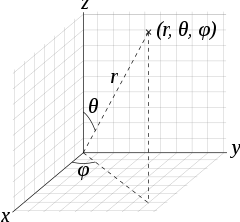
根据这篇文章 Spherical coordinate system 可以了解到如何将球坐标系转换到笛卡尔坐标系。其中 。
其实根据前面变换中的旋转,我们自己也能推出上面的公式。
createSphere#
现在就让我们将上面公式变成代码吧。
function createSphere(  radius = 1,  widthSegments = 8,  heightSegments = 6,  phiStart = 0,  phiLength = Math.PI * 2,  thetaStart = 0,  thetaLength = Math.PI) {  const maxWS = widthSegments + 1  const maxHS = heightSegments + 1  const thetaEnd = Math.min(thetaStart + thetaLength, Math.PI)  const numVertex = maxWS * maxHS
  const position = []  const index = []
  let u, v  for (let i = 0; i < maxHS; i++) {    v = i / heightSegments    for (let j = 0; j < maxWS; j++) {      u = j / widthSegments      position.push(        -radius * Math.cos(phiStart + u * phiLength) * Math.sin(thetaStart + v * thetaLength),        radius * Math.cos(thetaStart + v * thetaLength),        radius * Math.sin(phiStart + u * phiLength) * Math.sin(thetaStart + v * thetaLength)      )    }  }
  let a, b, c, d  for (let i = 0; i < heightSegments; i++) {    for (let j = 0; j < widthSegments; j++) {      a = j + maxWS * i      b = j + maxWS * (i + 1)      c = b + 1      d = a + 1
      if (i !== 0 || thetaStart > 0) index.push(d, a, c)      if (i !== (heightSegments - 1) || thetaEnd < Math.PI) index.push(a, b, c)    }  }
  return createGeometryResult(    new Float32Array(position),    numVertex > 65536 ? new Uint32Array(index) : new Uint16Array(index),  )}
class SphereGeometry extends Geometry { constructor() { super(createSphere()) }}我们可以将球展开成二维平面,就像将地球展开成地图一样。其中经线是竖线,纬线是横线。
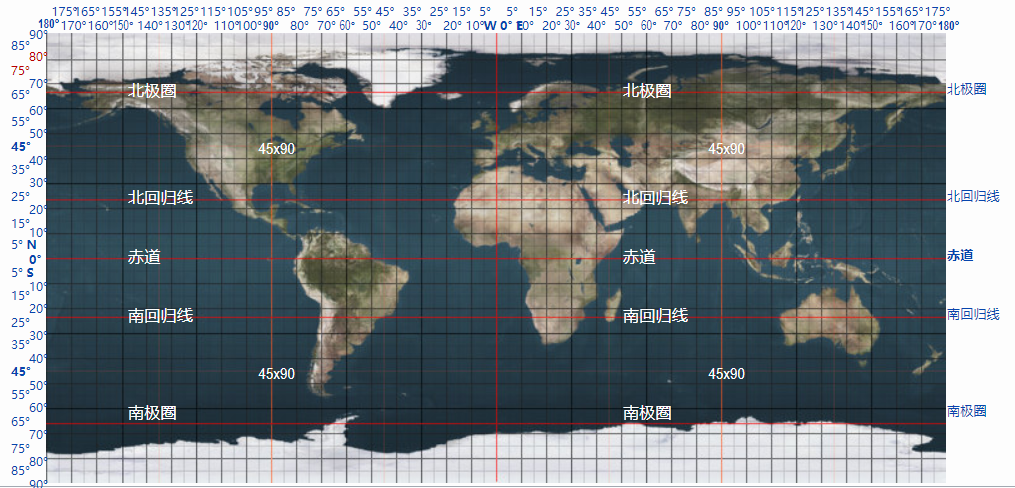
上面代码中 widthSegments 表示有几个宽度片段,heightSegments 有几个高度片段。其他的参数是上面公式中的参数。
上面代码中顶点坐标的顺序是 -x, z, y 是为了将它转换成右手坐标系,这样就可以 Y 轴穿过南北极,而不是 Z 轴。
我们在创建索引时判断了 i !== 0 || thetaStart > 0 和 i !== (heightSegments - 1) || thetaEnd < Math.PI。这是因为南北极的那一段是由一个个三角形组成,我们只要一个三角形就行了。
const renderer = new Renderer()const geometry = new SphereGeometry()
const program = new Program(renderer, {  vs: `    attribute vec4 position;    uniform mat4 world;
    void main() {      gl_Position = world * position;    }  `,  fs: `    precision highp float;
    void main() {      gl_FragColor = vec4(0, 1, 1, 1);    }  `})
const mesh = new Mesh(geometry, program, { mode: renderer.gl.LINE_STRIP })const scene = new Scene()scene.add(mesh)
let r = 0function draw() {  program.uniforms.world = Mat4.multiply(Mat4.fromXRotation(r), Mat4.fromYRotation(r))  renderer.render(scene)  r += 0.01  requestAnimationFrame(draw)}
draw()